
Keychron
V3 Max
Affiliate Disclosure: We may earn a commission when you buy through links on our site. This does not influence our editorial recommendations. Learn more about how we make money
Clara’s Verdict
ExcellentAn excellent mechanical keyboard that feels amazing to type on, won't break the bank, and gives you tons of customization options.
Best for: Anyone who types a lot and wants a better keyboard experience, Work-from-home folks who spend hours at their desk, People who like tinkering and customizing their gear, Budget-conscious shoppers who don't want to spend $200+ on a keyboard
Skip if: People who need perfect build quality with zero flex, Users who want tons of color and aesthetic options, Anyone who demands the absolute sturdiest keyboard ever made
Ethan’s Verdict
Very GoodExcellent typing feel and price don't fully compensate for PCB flex and awkward design choices that hint at cost-cutting.
Best for: Budget-conscious typists and coders, Keyboard modders willing to work around flaws, Casual gamers needing wireless reliability
Skip if: Users demanding flawless build quality, Competitive gamers requiring macro functionality, Buyers who want premium aesthetics
Clara’s Pros & Cons
- +Typing feels absolutely amazing and genuinely improves accuracy
- +Durable PBT keycaps hold up beautifully after weeks of heavy use
- +Intuitive customization through the Keychron Launcher app
- +Great battery life and flexible connectivity options
- −PCB flexes slightly in upper corners under pressure
- −Volume knob placement is awkwardly positioned and hard to reach
- −Limited color options, only black case available
- −One-year warranty only covers defective parts
Ethan’s Pros & Cons
- +Typing feel rivals keyboards costing twice as much
- +Intuitive Keychron Launcher makes customization painless
- +72-hour battery life is legitimately impressive
- +Hot-swappable switches and QMK support for modders
- −PCB bends in upper corners from inadequate internal support
- −Volume knob placement breaks natural reach and feels awkward
- −Limited color options restrict aesthetic personalization
- −One-year warranty covers defects only, not accidental damage
Score Breakdown
Performance & Response8.512% wt
Comfort & Ergonomics9.025% wt
Build Quality7.515% wt
Features & Software8.512% wt
Customization8.512% wt
Wireless & Battery8.010% wt
Value9.014% wt
Score Breakdown
Performance & Response8.525% wt
Comfort & Ergonomics8.015% wt
Build Quality6.520% wt
Features & Software8.515% wt
Customization8.510% wt
Wireless & Battery7.510% wt
Value9.05% wt
Clara’s Full Review
A Keyboard That Actually Makes You Want to Type
Here's the thing about the Keychron V3 Max: it's genuinely one of those products that makes your everyday life better. At under $110, you're getting a mechanical keyboard that reviewers describe as one of the best-feeling they've ever typed on, which is saying something.
The typing experience is where this keyboard wins you over. The Gateron switches feel responsive with great bounceback, and the lubricated stabilizers are smooth and quiet. Reviewers actually reported improved typing speed and accuracy, which tells you everything you need to know about comfort. The keycaps have a friendly shape that just feels right under your fingers, and the PBT material is durable enough to handle thousands of hours of typing without developing that worn-out shiny look.
What makes this keyboard special for busy people is that it's lightweight and portable. If you're bouncing between home and office, or just want a nicer keyboard without the weight of a tank, this works beautifully. Plus, the battery lasts a couple of weeks, so you're not constantly hunting for a charger.
The customization is genuinely user-friendly. The Keychron Launcher app is intuitive, so you can remap keys and adjust RGB lighting without feeling like you need a computer science degree. Hot-swappable switches mean you can experiment with different feels without soldering anything. It's the kind of customization that appeals to people who like tinkering without overwhelming casual users.
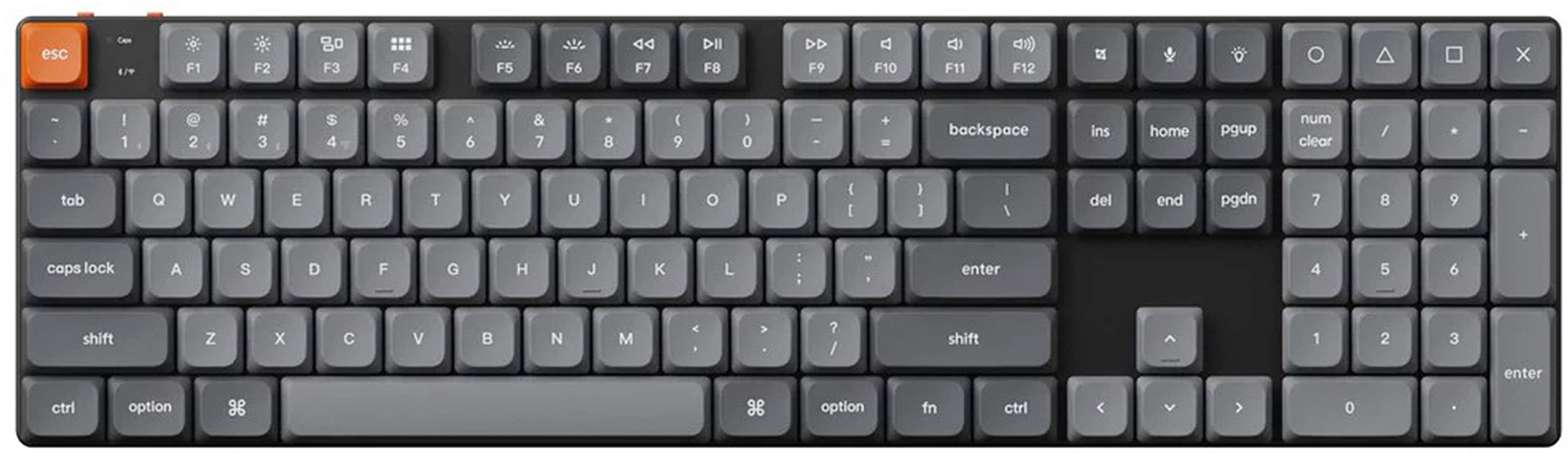
There are a couple of minor annoyances. The PCB does flex a bit in the upper corners, and the volume knob is awkwardly placed between the function and navigation keys, making it a pain to adjust. Color options are limited to black cases, which some people might find boring. But honestly, at this price point, these are small compromises.
The bottom line is that reviewers consistently say the quality of typing and features justify the price. You're getting a keyboard that feels premium to use, lasts through heavy workloads, and won't strain your budget. For anyone who spends hours typing, this is genuinely worth the investment.
Ethan’s Full Review
The V3 Max is a Solid Budget Buy Held Back by Lazy Design
Keychron's V3 Max sits in that sweet spot where price and performance align well enough to justify the purchase, but not so perfectly that you ignore the corners cut to hit that $109.99 target.
Let's start with what works. The typing experience is genuinely competitive. Gateron linear switches with low resistance and satisfying bounceback create a responsive feel that rivals keyboards costing double the price. The lubricated stabilizers are quiet and smooth, and the double-shot PBT keycaps won't develop shine after months of heavy use. If you're a typist or coder, the V3 Max delivers exactly what matters: consistent, satisfying keystrokes that improve accuracy and speed.
The software story is equally strong. Keychron Launcher is intuitive and handles remapping and RGB customization without requiring you to touch the command line. QMK firmware support and hot-swappable switches give modders real flexibility. For $110, you're getting customization options that used to require soldering skills.
But here's where Keychron's cost-cutting becomes obvious. The PCB bends due to lack of support in the upper corners. This isn't a minor cosmetic issue, it's a structural weakness that hints at decisions made in the engineering phase purely to hit a price target. The plastic case is sturdy and doesn't flex under normal pressure, but the internal architecture doesn't support the PCB properly. That's a design failure, not a manufacturing tolerance.
Then there's the volume knob. It's positioned awkwardly between the function keys and navigation cluster, forcing an unnatural reach that breaks the flow of use. This feels like the knob was added as an afterthought without considering actual hand positioning. It's a minor irritation that compounds over thousands of keypresses.
The color palette is restrictive too. Black case with gray, black, or red keycaps. That's it. Competitors at this price offer more aesthetic flexibility, which matters when you're staring at this thing eight hours a day.
The warranty is also worth noting: one year, defects only. Drop it once and you're buying a replacement. At $110 that stings less than it would at $300, but it's worth knowing.
The Real Verdict
The V3 Max is a genuinely good keyboard for the money. The typing experience, wireless reliability, and customization options justify the price. But Keychron made some lazy design choices that prevent this from being great. The PCB flex issue in particular suggests the engineering team prioritized hitting a price point over delivering flawless execution. At $109.99, you get strong value despite these flaws. At $150, this keyboard would be harder to recommend.
Specifications
| type | Mechanical |
| backlight | RGB |
| key switch | Gateron |
| battery life | 72 hours |
| connectivity | Bluetooth/Wired |
Overall Rating
Related Reviews
Keychron V3 Max vs Epomaker AK820 Pro vs Redragon K552 (2025)
Which mechanical keyboard wins? We compare Keychron V3 Max, Epomaker AK820 Pro, and Redragon K552 across typing feel, features, and value to find the best.
Keychron Q1 Pro vs ASUS ROG Strix Scope II 96 vs SteelSeries Apex Pro TKL
Which wireless mechanical keyboard wins? We compare Keychron Q1 Pro, ASUS ROG Strix Scope II 96, and SteelSeries Apex Pro TKL on build, performance, and value.
Wooting 60HE+ vs Razer BlackWidow V4 Pro vs Corsair K100 RGB (2024)
Which gaming keyboard wins? We compare Wooting's analog switches, Razer's feature-packed V4 Pro, and Corsair's flagship K100 to find the best.
Head-to-Head Comparisons
Review History
Initial review from real source data
Initial review from real source data
Editorial Independence
Our reviews are based on research from trusted expert sources. We may earn commissions from affiliate links, but this never influences our ratings or recommendations. How we score · Editorial policy · Report an error
Related Keyboards


Lowest Price Vendor Auto-Selected
Lowest Price Vendor Auto-Selected